
Harness telemetry
Are you using Claude or ChatGPT subscriptions? Are you running a local LLM? Have you ever wondered what it would cost if you had to pay for every token you consume? I did, and I tried to find answers and a solution to gain these insights easily.
Don't care about the why? Jump right to the how.
Why?
I have been using Claude Code for a while, and I think it is a great tool. I have the Pro subscription. At some point, I also managed to get myself a ChatGPT subscription. And I have been toying around with local LLMs as well. There's an unfinished post about the latter waiting to be published for a while actually. The short summary is that I use Ollama to run LLMs locally and access them through OpenCode. In an ideal world I would have switched to using Claude and ChatGPT in OpenCode as well, so that I only needed one tool, but sadly, Anthropic cut support for this for their subscriptions. The only way to use Anthropic models in OpenCode is via the API, which you pay per token. The OpenAI models can be used in OpenCode via the subscription. So now I use two harnesses: Claude Code for Anthropic models and OpenCode for OpenAI models and local LLMs.
My plan with this setup was to go towards a system where one model could be used for planning work, another for implementing it, and a third to review. Ideally, the reviewer should be of another model family than the implementation. And if possible, the planner should be yet another one. I had this in mind as:
- Claude Code for planning (Opus or maybe Fable)
- OpenCode for implementation (local LLM)
- OpenCode for review (GPT)
But there are a lot of variations available as well, and depending on the type of work they might make more sense. Up until now I've been using Opus and Fable for planning and Sonnet a lot for implementation. And I started to experiment with using GPT-5.6 Sol as reviewer. I have also been thinking about trying out some of the Chinese models via OpenRouter. And all this raised cost-related questions:
- If I use a local LLM for implementation: what would have been the cost if I had done it with Sonnet instead?
- What would it cost to implement a feature using an OpenRouter model?
- If at some point subscriptions are cut, what would be the cost of using OpenRouter models? Or usage-based pricing at Anthropic and OpenAI?
Another important aspect is that I use both my desktop and my laptop. So I would want a solution that works across machines.
Solutions
So I started to look for answers and started sparring with Claude about ways to gain these insights easily.
Out-of-the-box
OpenAI and Anthropic both have their usage metrics, which I always have open in a tab of my browser. But that doesn't tell you anything about how much tokens you consumed, let alone what the real cost of these would be.
OpenCode shows you the size of the context by default and how much you have spent. But when using a subscription at
OpenAI or running local models, this cost is always zero. Claude Code has the /usage command, which shows you how much
tokens you have consumed and what the price of that would be in a usage-based pricing model.
None of these said anything cross-harness or made it easy to quickly see what the cost could've been using OpenRouter pricing.
Available tooling
I am not the only person who wants to have insights in these things.
There are local log readers for coding harnesses, but these are all machine-specific, not across machines.
- ccusage reads Claude Code, OpenCode, Codex, and several other agents, reports daily/monthly/session/5-hour-block, exports JSON, and prices via LiteLLM's price table with per-model overrides.
- ocsight, opencode-stats, opencode-tokenscope, opencode-usage, and OpenCode Monitor are all OpenCode-only.
- Menu-bar apps for macOS: TokenBar, tokcat, CodexBar, ClaudeBar, AgentPeek, SessionWatcher. All single-machine, all "what did I spend," none "what would I have spent."
- Viberank takes ccusage output and puts it on a public leaderboard. It centralizes across machines, but it is a leaderboard, not a private dashboard.
There are tools that are gateways/proxies and can work across machines. But these are usually meant to track cost, which is a valid use-case for companies with a lot of users on the same platform or even across platforms. They are not meant to compare against counterfactuals, though, which is what I want.
A proxy is an extra point of failure, and in the end I decided against it in favor of a local solution that can resync to the database later on in case of a crash or other failure. The same reason Claude Code is no longer allowed in OpenCode also causes this route to be not allowed, even if it technically would be possible.
Two interesting tools:
- LiteLLM: see what each device spent, includes Prometheus metrics, and even has budgets and rate limiting. Nothing I need, but useful for companies. They don't support counterfactuals though.
- SigNoz: an OpenTelemetry back-end; Claude Code has built-in OTel support and OpenCode has plugins to enable it. A very interesting tool, but it didn't check all my boxes.
Custom solution
Initially I was looking into an OpenTelemetry-based solution, but I decided against it in favor of a local solution that can resync to the database later on in case of a crash or other failure. I also wanted a system that supports an easy backfill. So SigNoz was not a good fit.
The Claude Code restrictions made the proxies out of the question, even if they technically would be possible. So I needed a solution that would not in any way violate the terms of use of Anthropic.
So in the end this all led me to build my own solution.
Custom telemetry
There were clear requirements by now:
- Multi-device aggregated telemetry
- Support for both Claude Code (subscription-based) and OpenCode
- Showing cost for subscription usage if it were usage-based
- Calculating counterfactual pricing
- Backfilling support
- Resyncing in case of a crash or other failure
I have a Raspberry Pi at home I use to run some always-on stuff. The RPi, my laptop, and my desktop are all on my Tailscale network. So it made sense to use the RPi to aggregate custom telemetry. You could use a cloud service as well if you would prefer that.
What was to be made: tooling that runs regularly on the laptop and desktop to collect telemetry data and sync it to a database. The RPi would run a Postgres and a Grafana to visualize the data.
Claude Code keeps JSONL which contains, next to all your session data and transcripts, the telemetry data. OpenCode keeps similar data in an SQLite database. The harness-telemetry agent on the client extracts the telemetry data from these, marks which ones have been processed, and syncs them to the database on the RPi.
The cost of each entry is added based on the usage-based pricing available in OpenCode's models.json
(~/.cache/opencode/models.json). On top of that, entries are added for counterfactual pricing against OpenRouter
pricing, which resides in that same models.json.
A doctor command was added to check the health of the harness-telemetry agent before actually sending data. This was
especially useful for debugging, and especially before running the first actual backfill.
Note: all of this was basically vibe-coded without much instruction. This is not to be considered production-ready. It is good enough for my personal use and for the use-cases I have in mind. I did have it reviewed by GPT-5.6 Sol and Fable 5.1 and ended up adding unit tests (which were initially not considered), after finding multiple issues.
After a few iterations, it seemed to be working perfectly. And on top of being able to see usage-based pricing and counterfactual pricing, this also gave insight into other things:
- Pricing per project
- Most expensive sessions
- Distribution between laptop and desktop
- Distribution of models
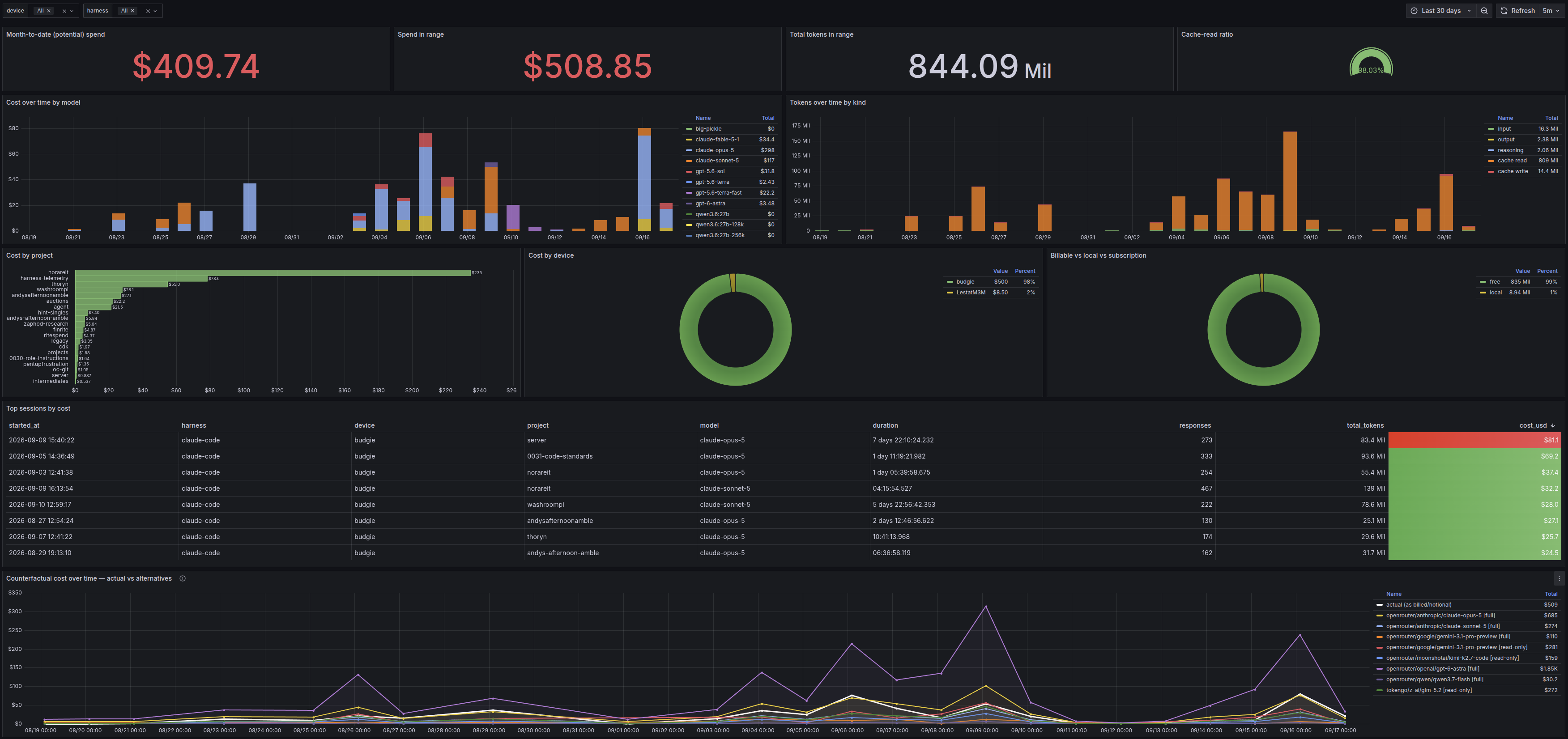
The data nerd in me got very excited from seeing all this, and I'm sure I'll be looking at this a lot in the future.
If you want to try it out yourself, you can find the code on GitHub.
The server directory contains everything for hosting the database and the Grafana instance on the RPi. The agent
directory contains the CLI tool which does the local processing and syncing to the database. The README.md contains
installation and usage instructions.